My Hello World for AI Agents
It's 2026, and AI has had a real impact on the way we work, especially in engineering. You can ask AI to do the heavy lifting for you. It feels like magic. But in order to harness the power of AI, you need to understand how it works, so you can become the director of how it works for you.
In Android development, you learn the basics by building a todo app. In agent development, I did the same: I built a todo app that accepts natural language. The goal wasn't a great todo app. It was to understand how agents think.
What Makes This Different From a Regular Todo App
There are terms on the rise recently, other than "vibe coding," and one of them is "agentic coding." Agentic coding is an approach where you delegate multi-step tasks to an AI agent that can reason, use tools, and make decisions autonomously, rather than just completing a single prompt.
In a regular todo app, you click a button. In this one, you type: "add buy milk, mark read book as done." The agent has to figure out that there are two intentions in that sentence, handle each one, and give you a coherent result. That loop (LLM → decision → action → result) is exactly what I wanted to learn.
This is the core idea behind what Anthropic describes in their post on building effective agents: "The basic building block of agentic systems is augmentations such as retrieval, tools, and memory."
Designing the Graph in LangGraph
The first thing I had to figure out was: what is the shape of a single user request? After some thinking, I landed on three nodes: an intent parser, a parallel runner for each extracted intent, and an aggregator at the end.
The key insight is the fan-out step. A message like "add buy milk, mark read book as done" contains two distinct intentions. Instead of handling them sequentially in one blob of logic, LangGraph lets you spin up a parallel branch for each intent. The aggregator then waits for all branches to finish and synthesizes a single response.
This is one of the things I appreciated most about LangGraph. The graph is explicit: you define nodes and edges, and you can read the wiring like a diagram. Compare that to a single giant prompt: you have no idea what decision path ran, and when something goes wrong, you have no map.
Building It: Key Concepts
State and how nodes communicate
Every node reads from and writes to a shared state object. Mine has three fields: the full conversation messages, the intents array extracted by the parser, and a processedIntent (the single intent a given branch is currently working on). When LangGraph fans out, it injects one intent per branch via that last field.
Intent parsing with structured output
The intent parser is the entry point for every request. I use .withStructuredOutput() to get a typed, schema-validated object back instead of raw LLM text. The parser also resolves relative dates using chrono-node, so "by Friday" becomes an ISO 8601 timestamp before it touches any tool.
Each extracted intent looks like this:
{
  type: "create_task",
  complexity: "reasoning",   // "simple" | "reasoning"
  confidence: 0.95,
  entities: {
    title: "review Q1 report",
    due_date: "2025-04-11T23:59:59Z",
  },
  reasoning: "user said 'by Friday', date resolved to April 11"
}
The complexity field drives model selection downstream. Simple CRUD operations use Claude Haiku, fast and cheap. Anything involving reasoning, relative comparisons, or ambiguous references gets routed to Sonnet.
The agentic loop
Each parallel branch runs through a subgraph, a mini graph inside the main graph. This is what makes it agentic: the LLM can call a tool, see the result, and decide to call another tool before giving a final answer.
export const intentSubgraph = new StateGraph(JotAIAnnotation)
  .addNode("handle_intent", handleIntentNode)
  .addNode("tools", new ToolNode(tools))
  .addEdge(START, "handle_intent")
  .addConditionalEdges("handle_intent", shouldContinue, {
    tools: "tools",
    done: END,
  })
  .addEdge("tools", "handle_intent") // loop back
  .compile();
After every LLM response, a router checks whether the model produced any tool calls. If yes, execute them and loop back. If no, the branch is done. This cycle (call tool, read result, decide) is the agentic loop pattern in its simplest form.
Aggregation
The aggregator is a barrier node. It runs after all parallel branches have finished. For a single intent it does nothing. For multiple intents, it collects the final response from each branch and asks a model to synthesize them into one coherent reply, so you get "Added 'buy milk'. 'Read book' is now marked done." instead of two separate outputs.
The Learning Moment: "Did It Work Correctly?"
You have output, but you don't know what happened inside. Did the intent parser correctly identify both intentions? Did it route to the right node? Did the aggregator capture all the results?
This is the moment observability goes from optional to essential. You can't learn from something you can't see. And when you're building your own agent, without a provider orchestrating everything, there's no built-in window into what's happening. You need to create one.
As coders, we usually don't have to worry about this because the provider takes care of it. They take your input, parse your intention, process it, synthesize the result. That's a simplified metaphor for an agentic system, of course, not to mention the loops and evaluations happening behind the scenes. But when you build your own, that monitoring is your responsibility.
Wiring Phoenix via OTEL
That window is Arize Phoenix, an open-source LLM observability platform that provides tracing, monitoring, and evaluation for AI applications. It captures every LLM call, tool invocation, and retrieval step with full context.
There are other popular tracing platforms out there, like LangSmith. LangSmith has a nice interface, but it primarily targets Python. Since I'm mostly using TypeScript, I chose Phoenix instead. Plus, I can self-host it on my homelab; installation is straightforward, and I just point my OTEL exporter at it. My traces stay on my own infrastructure.
The setup is a few lines:
import { register } from "@arizeai/phoenix-otel";
import { LangChainInstrumentation } from "@arizeai/openinference-instrumentation-langchain";
import * as CallbackManagerModule from "@langchain/core/callbacks/manager";

const tracerProvider = register({ projectName: "jotai", batch: false }); // call tracerProvider.shutdown() before process exit

const lcInstrumentation = new LangChainInstrumentation();
lcInstrumentation.manuallyInstrument(CallbackManagerModule);
And in .env, point it at your self-hosted instance:
PHOENIX_COLLECTOR_ENDPOINT=http://your-homelab-ip:6006
The manuallyInstrument call is required for LangChain specifically: it hooks into LangChain's callback system, which isn't auto-discoverable by standard OTEL. The batch: false option flushes spans immediately, which matters for short-lived scripts that might exit before a batch interval fires.
What I Actually Learned From the Traces
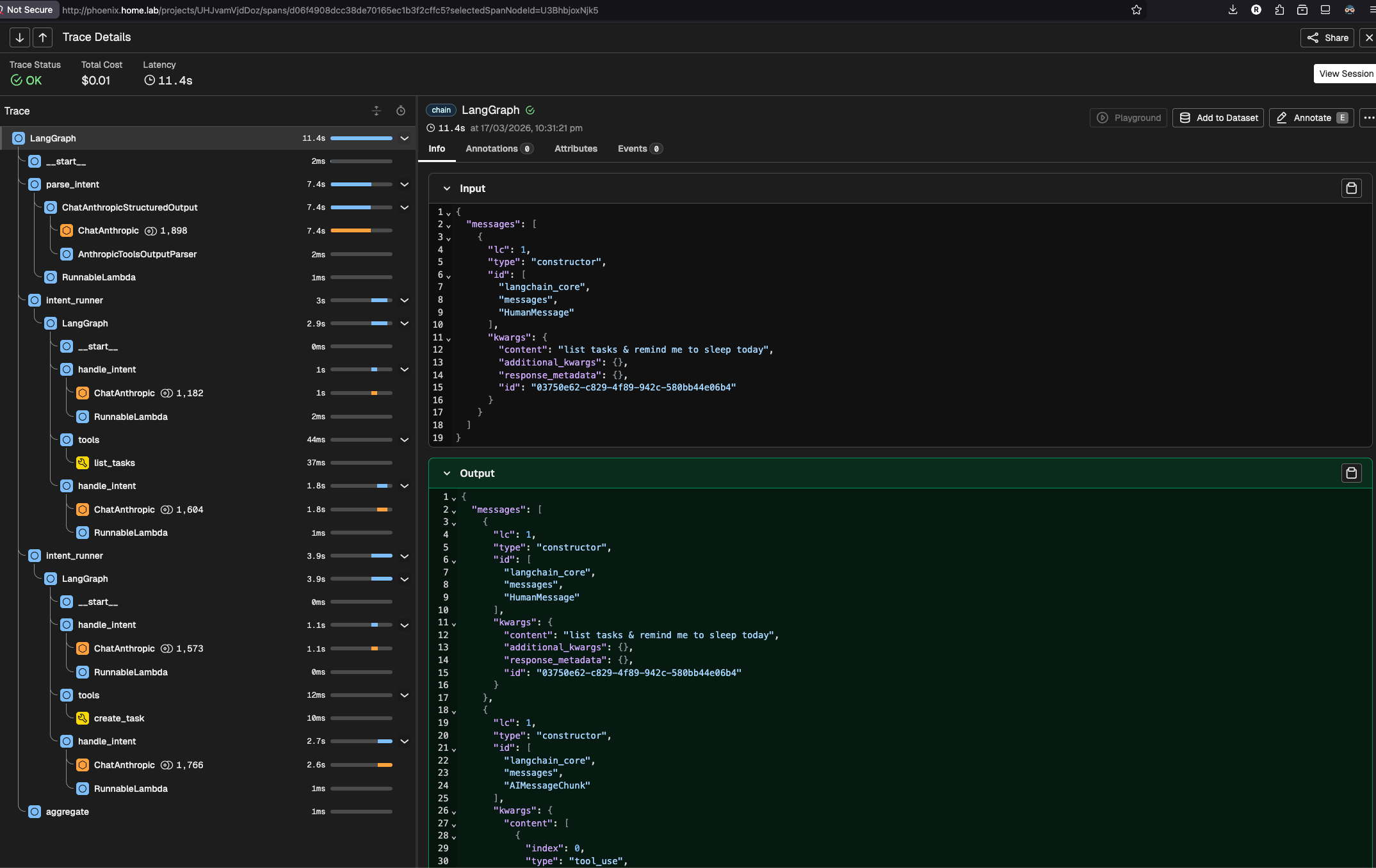
The first thing I noticed was model selection in action. I could see each span labeled with its model: Haiku for the intent parser and simple CRUD branches, but Sonnet lighting up whenever a daily_briefing or a message with a relative date came in. Before tracing, this was invisible. I had written the routing logic but had no way to verify it was actually firing correctly.
The second thing was more unexpected. I hit a 400 error from the Anthropic API when running multi-step tool calls. The state object holds the full conversation history, and I was passing all of it to the model on every invocation. The problem is that previous turns contain tool_result messages (outputs from past tool calls) whose corresponding tool_use messages are buried further back in the history. The Anthropic API requires every tool_result to have a matching tool_use in the same context. When it finds one without a match, it returns a 400.
Phoenix made this visible immediately. I could see the exact message array being sent to the model and spot the orphaned tool_result blocks. Without the trace, the 400 error alone tells you nothing about which messages caused it.
The fix was to only send messages from the current turn:
const lastHumanIdx = state.messages.findLastIndex((m) => isHumanMessage(m));
const toolChain = state.messages
  .slice(lastHumanIdx + 1)
  .filter((m) => isAIMessage(m) || isToolMessage(m));
Find the last human message (the start of the current turn), take everything after it, and filter to only the AI and tool messages from this turn's agentic loop. History from previous turns stays out of it.
Without Phoenix, I would have been guessing at what was in state.messages. With it, I could see the exact payload being sent. That's the difference between debugging in the dark and debugging with a map.
What's Next
The agent works, but it forgets everything on restart and can't search tasks semantically. A few natural next steps:
Memory with pgvector. Right now tasks are stored as plain rows. Adding a vector embedding column (Postgres + pgvector) lets the agent do semantic search: "tasks similar to this one," or a smarter daily briefing that surfaces what's actually relevant rather than just listing everything due today.
Persistent checkpointing. The agent currently uses MemorySaver, which lives in memory and resets when the server restarts. Swapping to @langchain/langgraph-checkpoint-postgres gives real conversation persistence across sessions. Paired with pgvector, this is the foundation of a proper memory layer.
Evaluation with Phoenix. Phoenix has built-in LLM-as-judge evaluators. You could write one that checks intent parsing accuracy: given input X, did the agent extract the right intent type and entities? This turns observability into a feedback loop and closes the gap between "it seems to work" and "I can measure how well it works."
Multi-turn clarification. When confidence drops below the threshold, the agent asks a free-form question. A structured follow-up loop (ask a specific question, wait for the answer, re-parse) would make the agent feel considerably more natural in ambiguous situations.
Final Thoughts: Start Simple, Observe Everything
The todo app was the right starting point. It was familiar enough that I wasn't fighting the domain while also learning the framework, but it had just enough complexity (multi-intent parsing, parallel branches, an agentic loop) to expose real patterns.
If you're learning how to build agents, my suggestion is: start with a graph you can draw on a whiteboard, wire up observability from day one, and let the traces teach you. You'll learn more from watching one real trace than from reading ten blog posts about agent architecture, including this one.